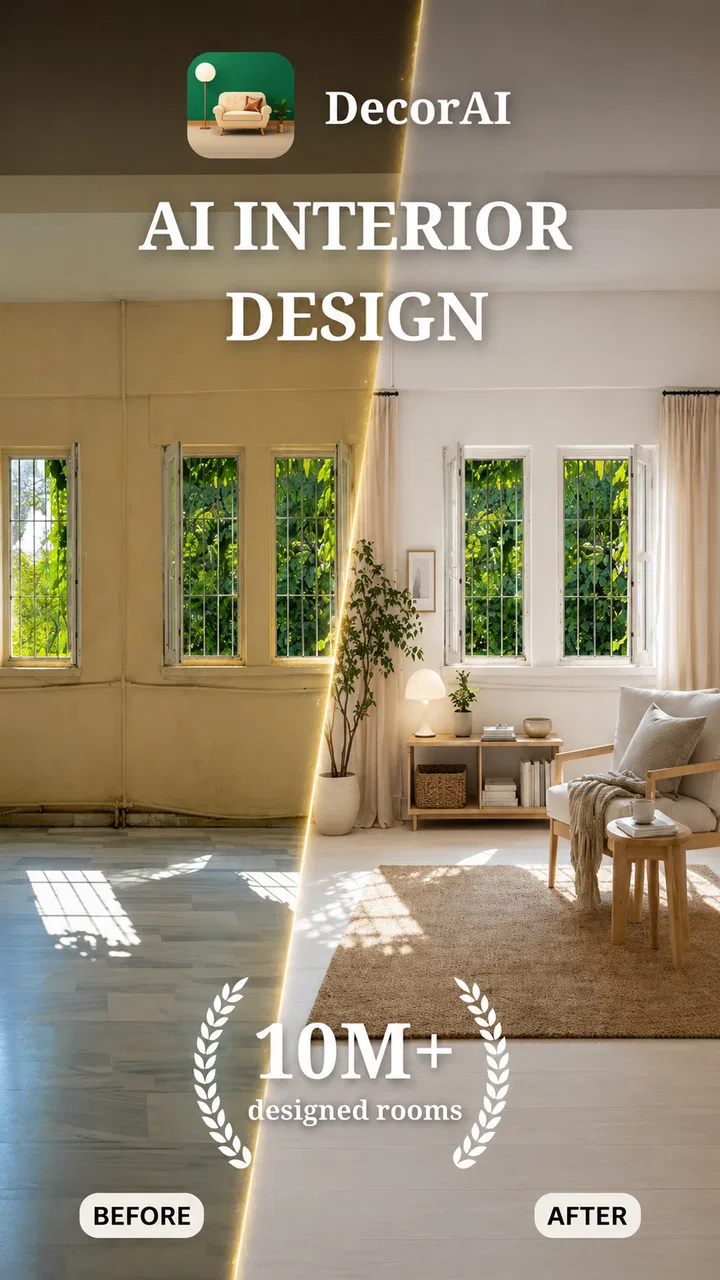
Decor AI: AI Interior Design
- 4.6
- Rating
- 50.00K
- Installs
- Free
- Price

 Analysis by App-foxy
I found Decor AI: AI Interior Design most useful as a fast visual brainstorming tool rather than as a complete interior-design service. The app takes a photo of a room and uses artificial intelligence to suggest a remodeled look, which makes it easy to move from “I wonder what this space could become” to a concrete image in a short session. That simple idea is the reason I would recommend it to renters, homeowners, and anyone stuck between several decorating styles.
My overall impression is positive, but with an important qualification: the result is a concept, not a construction plan. Decor AI can help you decide whether a warmer palette, a different furniture arrangement, or a more dramatic style feels right. It is much less suitable when you need exact dimensions, dependable product matching, renovation costs, or professional architectural guidance. Used with that distinction in mind, it is a surprisingly practical addition to a home-planning routine.
What using Decor AI feels like in practice
The app belongs to the House & Home category and is developed by Rocket Digital Apps. Its central workflow is refreshingly direct. I start with a room image, choose the kind of visual direction I want to explore, and let the app reinterpret the space. That removes the blank-page problem that often makes decorating feel harder than it should. Instead of collecting dozens of unrelated inspiration photos, I can see an idea applied to my own walls, floor, windows, and furniture.
You May Also Like

 Pandora - Music & Podcasts
Pandora’s Music Is Easy to Start, but Harder to Recover
Pandora’s strength is its low-effort path from a seed to a station. Its weak spot is how much confidence it asks you to place in connection, setup, and quiet recovery.

 8 Ball Pool
 Is Built on Rivalries, Rematches, and Routine
A close look at the rivalries, rematches, shared routines, and unanswered safety questions that turn a quick pool match into a persistent mobile community.

 Samsung Music
’s Quiet Strength Is Playing What You Already Own
Its reach comes less from spectacle than from dependable access to a personal library. That simplicity is both the app’s strongest retention engine and its ceiling.

 AccuWeather: Weather Radar
AccuWeather Review: A Quick, Clear Forecast for Everyday Decisions
For everyday plans, the best forecast is the one you can understand quickly. AccuWeather makes rain timing, radar, and local conditions easy to act on, with a few trade-offs.

 Hill Climb Racing
Why Hill Climb Racing Still Turns Crashes Into One More Run
A tiny car, a bumpy hill and one more upgrade: Hill Climb Racing keeps resurfacing because its simple chaos makes every near-miss feel personal.

 AliExpress - Shopping App
AliExpress Makes Global Shopping Feel Personal, but Shoppers Bear the Risk
AliExpress turns a global marketplace into a pocket-sized discovery engine. Its reach is useful, its shopping loop compelling, and its trade-offs easy to miss.
More From Our News Desk
View All News


That personal context matters. A picture of a beautiful living room found elsewhere may look appealing because of its ceiling height, natural light, or generous proportions. A generated version of my own room exposes a more useful question: would this style still work with my actual layout? Even when the result is not perfectly realistic, it gives me something specific to react to. I can identify what I like, what feels too busy, and which parts of the existing room should remain.
The app is free to download, and it is suitable for Everyone. I also like that the current version is 3.3.5, because that signals an actively maintained product rather than a one-off experiment. It runs on Android 7.0 or later, so compatibility should cover many older devices as well as newer phones. The app has a 4.7 average from around 3.2 thousand ratings and has passed 50 thousand installs, which suggests that the basic concept is connecting with a real audience.
Those figures do not tell me whether every generated image will be excellent, but they do place the app in a reassuring middle ground: established enough to try, yet still specialized enough that its appeal depends on whether visual room experimentation is genuinely useful to me.
The strongest part: turning vague ideas into visible choices
Decorating decisions often fail at the stage where a person has to imagine the finished room. I may know that I want something calmer, brighter, or more contemporary, but those words are too broad to guide a purchase. Decor AI gives those vague preferences a visual starting point. That is its clearest strength, and it is more valuable than the short store summary might suggest.
I found the app particularly helpful for comparing moods rather than chasing a single “perfect” design. A room can feel welcoming with natural-looking materials, polished with restrained furniture, or expressive with stronger color. Seeing different interpretations of the same space helps separate a genuine preference from a passing interest. This is a better use of artificial intelligence than asking it to make every decision for me.
A useful workflow is to photograph the room before shopping, generate a few directions, and then write down the elements that appear repeatedly in the versions I prefer. Perhaps the consistent details are lighter walls, less visual clutter, or a stronger contrast around the seating area. I can then shop for those principles instead of copying every item from one generated image. The smartest use of the app is extracting design decisions, not treating the image as an exact shopping list.
That approach also helps when more than one person shares the home. Discussions about décor can become subjective very quickly. Showing two or three visual alternatives gives everyone a common reference point. It is easier to agree that one version feels too dark or that another leaves the room looking more open than it is to debate abstract style labels.
A realistic everyday scenario
Imagine I am preparing a living room for a move. The sofa is staying, the flooring cannot be replaced immediately, and the walls look plain in photographs. Before buying paint or shelves, I take a well-lit image and use Decor AI to test several directions. One version may make the room feel too formal, while another may show that a softer wall color and simpler accessories are more convincing with the existing sofa.
I would not copy the generated arrangement without checking the real space. Instead, I would use it to make a short action plan: test a paint sample near the window, measure the wall for shelving, remove one unnecessary piece of furniture, and compare lighting at night. The app has saved me from making a purchase based only on imagination. That is a modest benefit, but it can prevent expensive décor mistakes.
The same process works for a bedroom refresh, a home office, or a room being prepared for guests. It is also useful before asking a decorator for help, because arriving with a few visual references makes the consultation more focused. For a renter, the app can encourage reversible changes such as textiles, lighting, artwork, and furniture placement rather than pushing the user toward major alterations.
Where the visual results need careful judgment
AI-generated room concepts are persuasive because they look finished. That polish can create false confidence. Furniture may appear to fit more comfortably than it would in reality, walkways may be narrower than they seem, and objects can be blended or reshaped in ways that make the image attractive but impractical. I treat every output as a mood board with my room’s identity, not as proof that the proposed arrangement will work.
Lighting is another reason to stay cautious. A generated room can look balanced in a bright image while feeling completely different under the lamps I actually use. Colors also vary between screens and real paint samples. I would never choose wall paint, flooring, or fabric solely from the generated picture. The better method is to use the app to narrow the direction, then verify the choice with physical samples and measurements.
There is a similar issue with existing objects. The app may preserve the general presence of a sofa or table while changing its proportions, finish, or position. That is helpful for imagining a transformation, but it means the result should not be read as a technical rendering. If a particular heirloom, appliance, or structural feature must remain exactly as it is, I would use the image only for broad styling inspiration.
This limitation is not a reason to dismiss Decor AI; it defines the right level of trust. The app is strongest at answering “What feeling could this room have?” It is weaker at answering “Will this exact cabinet fit beside the door?” For the second question, a tape measure, floor plan, or dedicated planning tool is the better choice.
Small habits that make the app more useful
Photo preparation has a bigger effect than I expected. I get more meaningful ideas when the room is reasonably tidy, the camera is held at a natural height, and the main walls and floor are visible. A cluttered image gives the system less useful context and makes it harder for me to judge the design afterward. I also avoid extreme wide-angle shots, because they can make a small room appear larger than it really is.
I recommend keeping the original photo beside each generated concept. Without that comparison, it is easy to focus on the new décor and forget the actual constraints of the room. Looking back and forth shows whether the app has preserved the important features or quietly changed them. This is one of the simplest ways to avoid confusing a pleasing image with a realistic plan.
Another useful technique is to change one design question at a time. If I alter the style, color mood, furniture arrangement, and lighting all at once, I cannot tell which choice improved the room. I get more actionable insight by first exploring the overall style, then considering color, and finally thinking about accessories. This turns the app from a novelty generator into a lightweight decision-making aid.
I would also save only the concepts that lead to a real next step. Keeping every attractive result creates the same clutter as an oversized inspiration folder. A small set of images is easier to compare, discuss with someone else, and translate into a shopping or decorating checklist.
Free access and the role of in-app purchases
Decor AI is free, which makes it easy to test without committing money at the start. That is important for this kind of app because the value is personal: one user may immediately see how it helps, while another may prefer browsing photographs or arranging furniture manually. The free entry point lets me judge the quality and usefulness of the experience before deciding whether it belongs in my regular toolkit.
There are in-app purchases priced from $5.99 to $74.99 per item. That range deserves attention before spending. I would begin with a specific goal, such as comparing a few room directions, rather than buying access simply because a generated image looks impressive. If I only need inspiration for one weekend project, the higher-priced options may not make sense. If I am repeatedly planning rooms, I would still compare the cost with alternatives I already use.
The presence of purchases also changes how I evaluate the app. A free download is not automatically a free long-term experience, so I would read each purchase screen carefully and make sure I understand what I am paying for before confirming anything. The app’s strongest value should be visible during an initial trial: if the basic workflow does not help me make a better decorating decision, paying more will not solve that underlying problem.
For casual users, the free experience may be enough to settle a style question. For committed home improvers, paid access could be worthwhile if it supports a repeated workflow, but I would judge that by the quality and consistency of the results I personally receive rather than by the app’s rating alone.
Who should use it, and who should choose something else
I think Decor AI is a good fit for people who have a room they know they want to change but cannot yet describe clearly. It is especially approachable for first-time decorators, busy homeowners, renters looking for reversible ideas, and couples who need visual options before agreeing on a direction. It can also help someone preparing a room for sale by encouraging a more deliberate look at clutter, color, and furniture balance.
It is less suitable for users who want exact floor plans, verified product dimensions, contractor-ready drawings, or a reliable renovation budget. A manual room planner is better when measurements and circulation are the priority. A professional designer is better when the project involves structural work, accessibility, complicated lighting, or expensive built-ins. Inspiration boards are better when I want to collect real products and reference images without AI altering the room.
I would also skip it if I strongly prefer complete control over every object in a design. The appeal here is speed and interpretation, and that necessarily means giving the system room to make visual choices. Someone who enjoys building a room piece by piece may find a conventional planning app more satisfying and more precise.
Privacy-conscious users should make their own comfort judgment before uploading photographs of private spaces. I would avoid including personal documents, visible addresses, family photographs, or anything unrelated to the room itself. A clean, carefully framed image is better for both practical evaluation and personal caution.
How it compares with familiar decorating methods
Compared with scrolling through social media or image boards, Decor AI is more personal because it works from my room rather than from someone else’s finished space. That makes the inspiration less aspirational and more diagnostic. The trade-off is that an AI interpretation may be less trustworthy in details than a real photograph of a completed room.
Compared with a manual room-planning app, it is faster at producing a visual mood but weaker at enforcing real-world constraints. Manual tools reward patience and measurements; Decor AI rewards experimentation. I would use the two approaches together if a project mattered: generate a direction first, then verify it with dimensions and a more controlled layout.
Compared with hiring an interior designer, the app is obviously more accessible for early exploration, but it cannot replace conversation, site knowledge, or professional judgment. A designer can ask why a room is uncomfortable, notice practical issues that a photograph hides, and adapt a proposal to a budget and lifestyle. Decor AI is best viewed as the affordable first conversation, not the final authority.
My verdict after weighing the strengths and friction
Decor AI: AI Interior Design succeeds because it makes the first step of decorating less intimidating. I can use a real room photo to explore possibilities, compare moods, and turn uncertain preferences into a shortlist of practical changes. The app’s free starting point, Everyone rating, broad Android compatibility, and current version 3.3.5 make it easy for a wide range of people to try.
Its weakness is equally clear: attractive generated rooms can suggest a level of accuracy that the app should not be asked to provide. I would verify every important decision with measurements, physical samples, and a realistic look at lighting and movement. I would also approach the in-app purchase range carefully and pay only when the experience has already proved useful for my particular project.
Rocket Digital Apps has built a focused tool for visual exploration rather than an all-purpose renovation platform. I recommend it to anyone who needs help imagining a better version of a room, especially before shopping or discussing ideas with another person. I would choose a manual planner or professional advice for technical work. Used within those boundaries, Decor AI earns a place in my home-planning process because it turns indecision into something I can actually see and evaluate.
FAQs for Decor AI: AI Interior Design
01What is Decor AI: AI Interior Design and how does it work?
Decor AI is an innovative app that leverages artificial intelligence to help users design and visualize their interior spaces. By analyzing room dimensions and user preferences, it provides tailored design suggestions. Users can upload photos of their spaces, choose desired styles, and receive AI-generated layouts and decor ideas instantly.
02Is Decor AI: AI Interior Design suitable for professional interior designers?
Yes, Decor AI is designed to be useful for both professionals and amateurs. While it offers simple and intuitive tools for beginners, professionals can take advantage of its advanced features, such as 3D visualization and customizable design elements, to enhance their projects and presentations.
03How accurate are the design suggestions provided by Decor AI?
The app uses sophisticated algorithms to analyze user input and generate design suggestions. While the AI offers highly accurate and relevant recommendations based on current design trends and user preferences, users can tweak and customize these suggestions to better fit their unique style and needs.
04Does Decor AI support collaboration with other users or clients?
Yes, Decor AI includes collaboration features that allow users to share their designs with others. This is particularly useful for professionals working with clients or teams. Users can receive feedback, make adjustments in real-time, and ensure that all stakeholders are satisfied with the design process.
05What devices are compatible with Decor AI: AI Interior Design?
Decor AI is available for both Android and iOS devices. It supports a wide range of smartphones and tablets, ensuring a smooth and user-friendly experience. For the best performance, it is recommended to use the latest version of the operating system and a device with good processing power.
Pros
- User-friendly interface for easy navigation.
- Offers a wide range of design styles.
- Quick rendering of design concepts.
- Integrates well with smart home devices.
- Regular updates with new features.
Cons
- Limited free features; requires subscription.
- Occasional glitches in 3D rendering.
- Requires stable internet connection.
- Some designs may lack customization.
- Customer support response time can be slow.

Decor AI: AI Interior Design
Gallery